Hero with nav
A landing page opener over a dusk photograph, with a centred nav, a headline, one action and a product screenshot.
Your servers deserve a clearer view.
Logoipsum shows every project, machine and deploy in one place your whole team can read.
Get started free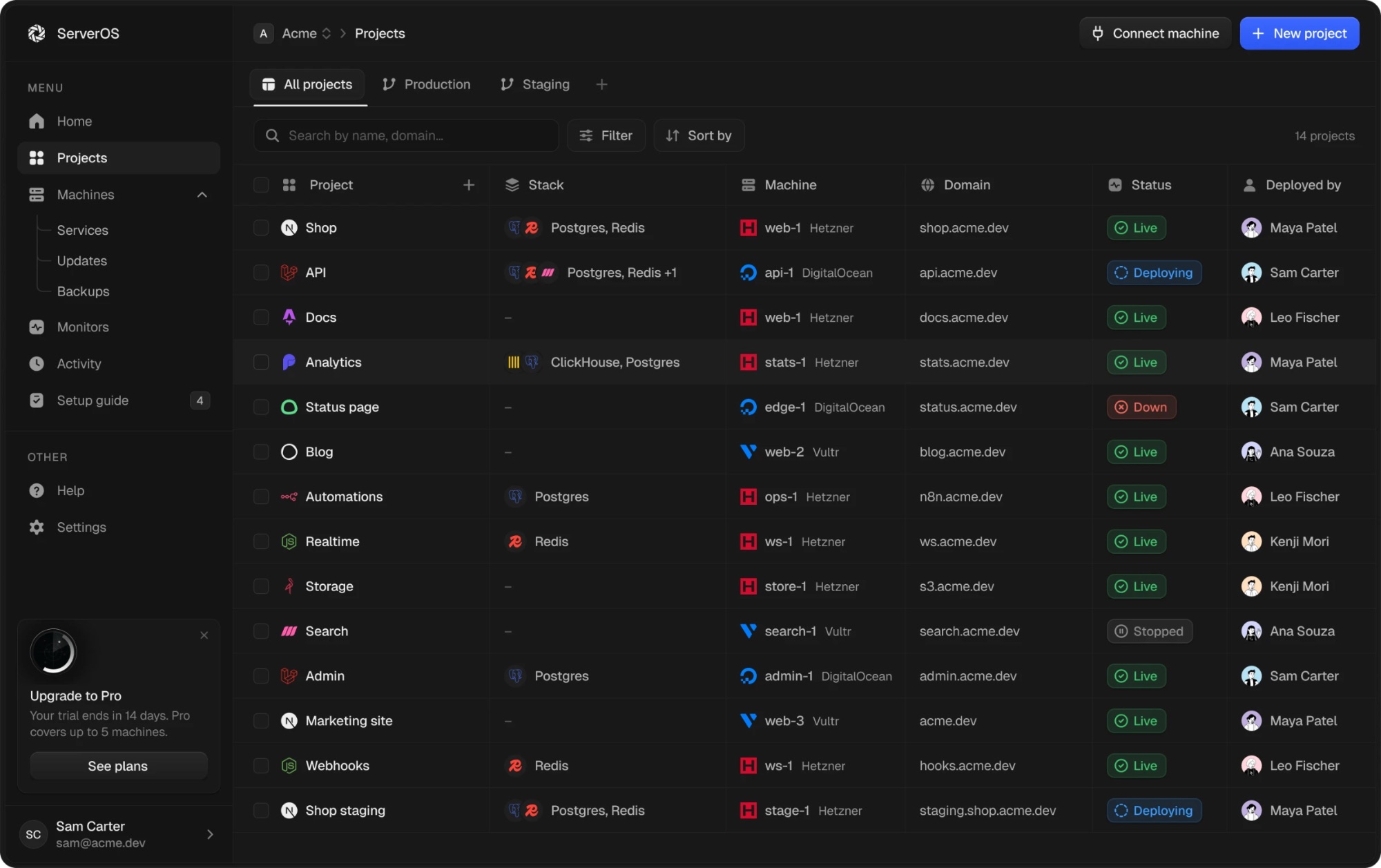
Intro
Logoipsum is a control panel built for teams without an ops person. Projects, machines and deploys sit in one place, under one login.
Every project shows where it runs and who deployed it. When something goes down, you know which machine to look at.
Options
Code
import "./hero.css";
import "./button.css";
import { Logo } from "./logo";

const links = ["About", "Features", "What you get", "Pricing"];
export function Hero() {
  return (
    <section className="dh-hero">
      <div className="dh-hero-scene">
        <header className="dh-hero-nav">
          <a className="dh-hero-brand" href="/"><Logo className="dh-hero-logo" /></a>
          <nav>
            {links.map((link) => (
              <a key={link} href="#">{link}</a>
            ))}
          </nav>
          <div className="dh-hero-account">
            <a href="#">Log in</a>
            <a className="dh-button" href="#">Get started</a>
          </div>
        </header>
        <div className="dh-hero-body">
          <h1>Your servers deserve a clearer view.</h1>
          <p>
            Logoipsum shows every project, machine and deploy in one place your
            whole team can read.
          </p>
          <a className="dh-button" href="#">Get started free</a>
        </div>
        <div className="dh-hero-shot">
          <img
            src="/blocks/hero-dashboard.jpg"
            alt="The product: a projects table showing each project's stack, machine, domain and status"
            width="2000"
            height="1257"
          />
        </div>
      </div>
      <div className="dh-hero-intro">
        <p className="dh-hero-tag">Intro</p>
        <p>
          Logoipsum is a control panel built for teams without an ops person.
          Projects, machines and deploys sit in one place, under one login.
        </p>
        <p>
          Every project shows where it runs and who deployed it. When something
          goes down, you know which machine to look at.
        </p>
      </div>
    </section>
  );
}.dh-hero {
container-type: inline-size;
background: var(--dh-bg, #fff);
color: var(--dh-fg, #171717);
font-size: 14px;
line-height: 1.5;
}
.dh-hero a {
text-decoration: none;
}
.dh-hero a:not(.dh-button) {
color: inherit;
}
.dh-hero-scene {
position: relative;
overflow: hidden;
padding: 0 32px;
background: #0e0e11 url("/blocks/hero-dusk.jpg") 50% 78% / cover no-repeat;
color: #fff;
}
.dh-hero-scene::before,
.dh-hero-scene::after {
content: "";
position: absolute;
inset: auto -2px -2px;
z-index: 2;
pointer-events: none;
}
.dh-hero-scene::before {
height: 300px;
-webkit-backdrop-filter: blur(3px);
backdrop-filter: blur(3px);
-webkit-mask-image: linear-gradient(transparent, #000 60%);
mask-image: linear-gradient(transparent, #000 60%);
}
.dh-hero-scene::after {
--fade: var(--dh-bg, #fff);
height: 240px;
-webkit-backdrop-filter: blur(14px);
backdrop-filter: blur(14px);
-webkit-mask-image: linear-gradient(transparent, #000 55%);
mask-image: linear-gradient(transparent, #000 55%);
background: linear-gradient(
transparent 0%,
color-mix(in srgb, var(--fade) 6%, transparent) 22%,
color-mix(in srgb, var(--fade) 24%, transparent) 42%,
color-mix(in srgb, var(--fade) 55%, transparent) 62%,
color-mix(in srgb, var(--fade) 84%, transparent) 80%,
var(--fade) 94%
);
}
.dh-hero-nav {
position: relative;
z-index: 3;
display: grid;
grid-template-columns: 1fr auto 1fr;
align-items: center;
gap: 24px;
max-width: 1000px;
height: 60px;
margin: 0 auto;
font-size: 13px;
}
.dh-hero-brand {
display: flex;
justify-self: start;
}
.dh-hero-logo {
display: block;
width: auto;
height: 20px;
}
.dh-hero-nav nav {
display: flex;
gap: 36px;
color: rgb(255 255 255 / 0.78);
}
.dh-hero-account {
display: flex;
align-items: center;
justify-self: end;
gap: 16px;
color: rgb(255 255 255 / 0.78);
}
.dh-hero-account,
.dh-hero-body {
--dh-fg: #f4f4f5;
--dh-bg: #17171a;
}
.dh-hero-account .dh-button {
font-size: 13px;
}
.dh-hero-body {
position: relative;
z-index: 3;
max-width: 620px;
margin: 0 auto;
padding: 64px 0 60px;
text-align: center;
}
.dh-hero-body .dh-button {
margin-top: 28px;
font-size: 15px;
box-shadow: 0 1px 2px rgb(0 0 0 / 0.3), 0 10px 24px -8px rgb(0 0 0 / 0.5);
}
.dh-hero-tag {
display: inline-flex;
align-items: center;
gap: 7px;
height: 26px;
margin: 0;
padding: 0 12px 0 10px;
border-radius: 999px;
background: rgb(255 255 255 / 0.05);
color: rgb(255 255 255 / 0.92);
font-size: 12px;
font-weight: 500;
line-height: 1;
box-shadow: inset 0 0 0 0.5px rgb(255 255 255 / 0.28);
-webkit-backdrop-filter: blur(10px);
backdrop-filter: blur(10px);
}
.dh-hero-tag::before {
content: "";
width: 5px;
height: 5px;
border-radius: 50%;
background: currentColor;
opacity: 0.75;
}
.dh-hero h1 {
margin: 0;
font-size: 50px;
font-weight: 400;
line-height: 1.12;
letter-spacing: -0.035em;
text-wrap: balance;
}
.dh-hero-body > p {
max-width: 380px;
margin: 18px auto 0;
color: rgb(255 255 255 / 0.78);
}
.dh-hero-shot {
position: relative;
z-index: 1;
max-width: 920px;
margin: 0 auto;
padding: 5px 5px 0;
border-radius: 16px 16px 0 0;
background: rgb(255 255 255 / 0.08);
box-shadow: 0 0 0 1px rgb(255 255 255 / 0.1), 0 30px 80px -10px rgb(0 0 0 / 0.7);
-webkit-backdrop-filter: blur(12px);
backdrop-filter: blur(12px);
}
.dh-hero-shot img {
display: block;
width: 100%;
height: auto;
border-radius: 12px 12px 0 0;
}
.dh-hero-shot {
-webkit-mask-image: linear-gradient(#000 62%, transparent 98%);
mask-image: linear-gradient(#000 62%, transparent 98%);
}
.dh-hero-intro {
position: relative;
z-index: 3;
margin-top: -2px;
padding: 74px max(32px, calc(50% - 250px)) 88px;
background: var(--dh-bg, #fff);
}
.dh-hero-intro .dh-hero-tag {
background: transparent;
color: var(--dh-muted, #5c5c5c);
box-shadow: inset 0 0 0 0.5px var(--dh-faint, #8a8a8a);
-webkit-backdrop-filter: none;
backdrop-filter: none;
}
.dh-hero-intro p:not(.dh-hero-tag) {
margin-top: 20px;
margin-bottom: 0;
color: var(--dh-muted, #5c5c5c);
font-size: 20px;
line-height: 1.35;
letter-spacing: -0.015em;
}
@container (max-width: 720px) {
.dh-hero-scene { padding: 0 20px; }
.dh-hero-nav { grid-template-columns: 1fr auto; }
.dh-hero-nav nav,
.dh-hero-account > a:first-child { display: none; }
.dh-hero-body { padding: 44px 0 44px; }
.dh-hero h1 { font-size: 34px; }
.dh-hero-body .dh-button { height: 44px; }
.dh-hero-scene::before { height: 200px; }
.dh-hero-scene::after { height: 160px; }
.dh-hero-intro { padding: 50px max(20px, calc(50% - 250px)) 56px; }
.dh-hero-intro p:not(.dh-hero-tag) { font-size: 18px; }
}.dh-button {
display: inline-flex;
align-items: center;
height: 2.6em;
padding: 0 1.15em;
border: 0;
border-radius: 0.65em;
background: var(--dh-accent, var(--dh-fg, #171717));
color: var(--dh-on-accent, var(--dh-bg, #fff));
font-family: inherit;
font-size: 1em;
font-weight: 500;
letter-spacing: -0.01em;
cursor: pointer;
box-shadow: 0 1px 2px rgb(0 0 0 / 0.2);
transition: transform 150ms cubic-bezier(0.23, 1, 0.32, 1);
}
.dh-button:active {
transform: scale(0.97);
}
.dh-button:focus-visible {
outline: 2px solid var(--dh-faint, #8a8a8a);
outline-offset: 2px;
}<section class="dh-hero">
<div class="dh-hero-scene">
<header class="dh-hero-nav">
<a class="dh-hero-brand" href="#"><svg class="dh-hero-logo" role="img" aria-label="Logoipsum" viewBox="0 0 240 40" xmlns="http://www.w3.org/2000/svg" fill="none"><g><path fill="currentColor" d="M201.495 9.38013H211.275L220.377 25.0806L229.509 9.38013H239.288V30H234.693V9.58633L222.822 30H217.961L206.061 9.58633V30H201.495V9.38013ZM172.037 21.9877C168.561 21.9877 165.763 19.1893 165.763 15.6839C165.763 12.208 168.561 9.38013 172.037 9.38013H198.696V13.9754H172.037C171.095 13.9754 170.329 14.7413 170.329 15.6839C170.329 16.656 171.095 17.4219 172.037 17.4219H192.392C195.868 17.4219 198.696 20.2203 198.696 23.7256C198.696 27.2015 195.868 30 192.392 30H165.763V25.4341H192.392C193.335 25.4341 194.1 24.6682 194.1 23.7256C194.1 22.7535 193.335 21.9877 192.392 21.9877H172.037ZM155.34 9.38013C159.758 9.38013 163.352 12.9739 163.352 17.4219C163.352 21.8404 159.758 25.4341 155.34 25.4341H134.72V30H130.154V9.38013H155.34ZM155.31 20.8388C157.225 20.8388 158.757 19.3071 158.757 17.4219C158.757 15.5072 157.225 13.9754 155.31 13.9754H134.72V20.8388H155.31ZM105.592 13.9754C102.41 13.9754 99.8477 16.5382 99.8477 19.69C99.8477 22.8714 102.41 25.4341 105.592 25.4341H122.618V21.8404H105.15V17.2746H127.213V30H105.592C99.8772 30 95.2819 25.4047 95.2819 19.69C95.2819 14.0049 99.8772 9.38013 105.592 9.38013H127.213V13.9754H105.592ZM65.7168 30V9.38013H70.2826V25.4341H93.3474V30H65.7168Z"/></g><g><path fill="currentColor" d="M52 40H33L25.6569 32.6569C24.596 31.596 24 30.1571 24 28.6569C24 25.5327 26.5327 23 29.6569 23H36L45 32H52V40ZM29 40H9L0 31V23H8.27208C10.659 23 12.9482 23.9482 14.636 25.636L29 40ZM19 12H0V3H28L31 0L46 15V23H36L22 9L19 12ZM0 13H10V14H0V13ZM0 15H10V16H0V15ZM0 17H10V18H0V17ZM0 19H10V20H0V19ZM0 21H10V22H0V21Z"/></g></svg></a>
<nav>
<a href="#">About</a>
<a href="#">Features</a>
<a href="#">What you get</a>
<a href="#">Pricing</a>
</nav>
<div class="dh-hero-account">
<a href="#">Log in</a>
<a class="dh-button" href="#">Get started</a>
</div>
</header>
<div class="dh-hero-body">
<h1>Your servers deserve a clearer view.</h1>
<p>Logoipsum shows every project, machine and deploy in one place your whole team can read.</p>
<a class="dh-button" href="#">Get started free</a>
</div>
<div class="dh-hero-shot">
<img src="/blocks/hero-dashboard.jpg" alt="The product: a projects table showing each project's stack, machine, domain and status" width="2000" height="1257" />
</div>
</div>
<div class="dh-hero-intro">
<p class="dh-hero-tag">Intro</p>
<p>Logoipsum is a control panel built for teams without an ops person. Projects, machines and deploys sit in one place, under one login.</p>
<p>Every project shows where it runs and who deployed it. When something goes down, you know which machine to look at.</p>
</div>
</section>.dh-hero {
container-type: inline-size;
background: var(--dh-bg, #fff);
color: var(--dh-fg, #171717);
font-size: 14px;
line-height: 1.5;
}
.dh-hero a {
text-decoration: none;
}
.dh-hero a:not(.dh-button) {
color: inherit;
}
.dh-hero-scene {
position: relative;
overflow: hidden;
padding: 0 32px;
background: #0e0e11 url("/blocks/hero-dusk.jpg") 50% 78% / cover no-repeat;
color: #fff;
}
.dh-hero-scene::before,
.dh-hero-scene::after {
content: "";
position: absolute;
inset: auto -2px -2px;
z-index: 2;
pointer-events: none;
}
.dh-hero-scene::before {
height: 300px;
-webkit-backdrop-filter: blur(3px);
backdrop-filter: blur(3px);
-webkit-mask-image: linear-gradient(transparent, #000 60%);
mask-image: linear-gradient(transparent, #000 60%);
}
.dh-hero-scene::after {
--fade: var(--dh-bg, #fff);
height: 240px;
-webkit-backdrop-filter: blur(14px);
backdrop-filter: blur(14px);
-webkit-mask-image: linear-gradient(transparent, #000 55%);
mask-image: linear-gradient(transparent, #000 55%);
background: linear-gradient(
transparent 0%,
color-mix(in srgb, var(--fade) 6%, transparent) 22%,
color-mix(in srgb, var(--fade) 24%, transparent) 42%,
color-mix(in srgb, var(--fade) 55%, transparent) 62%,
color-mix(in srgb, var(--fade) 84%, transparent) 80%,
var(--fade) 94%
);
}
.dh-hero-nav {
position: relative;
z-index: 3;
display: grid;
grid-template-columns: 1fr auto 1fr;
align-items: center;
gap: 24px;
max-width: 1000px;
height: 60px;
margin: 0 auto;
font-size: 13px;
}
.dh-hero-brand {
display: flex;
justify-self: start;
}
.dh-hero-logo {
display: block;
width: auto;
height: 20px;
}
.dh-hero-nav nav {
display: flex;
gap: 36px;
color: rgb(255 255 255 / 0.78);
}
.dh-hero-account {
display: flex;
align-items: center;
justify-self: end;
gap: 16px;
color: rgb(255 255 255 / 0.78);
}
.dh-hero-account,
.dh-hero-body {
--dh-fg: #f4f4f5;
--dh-bg: #17171a;
}
.dh-hero-account .dh-button {
font-size: 13px;
}
.dh-hero-body {
position: relative;
z-index: 3;
max-width: 620px;
margin: 0 auto;
padding: 64px 0 60px;
text-align: center;
}
.dh-hero-body .dh-button {
margin-top: 28px;
font-size: 15px;
box-shadow: 0 1px 2px rgb(0 0 0 / 0.3), 0 10px 24px -8px rgb(0 0 0 / 0.5);
}
.dh-hero-tag {
display: inline-flex;
align-items: center;
gap: 7px;
height: 26px;
margin: 0;
padding: 0 12px 0 10px;
border-radius: 999px;
background: rgb(255 255 255 / 0.05);
color: rgb(255 255 255 / 0.92);
font-size: 12px;
font-weight: 500;
line-height: 1;
box-shadow: inset 0 0 0 0.5px rgb(255 255 255 / 0.28);
-webkit-backdrop-filter: blur(10px);
backdrop-filter: blur(10px);
}
.dh-hero-tag::before {
content: "";
width: 5px;
height: 5px;
border-radius: 50%;
background: currentColor;
opacity: 0.75;
}
.dh-hero h1 {
margin: 0;
font-size: 50px;
font-weight: 400;
line-height: 1.12;
letter-spacing: -0.035em;
text-wrap: balance;
}
.dh-hero-body > p {
max-width: 380px;
margin: 18px auto 0;
color: rgb(255 255 255 / 0.78);
}
.dh-hero-shot {
position: relative;
z-index: 1;
max-width: 920px;
margin: 0 auto;
padding: 5px 5px 0;
border-radius: 16px 16px 0 0;
background: rgb(255 255 255 / 0.08);
box-shadow: 0 0 0 1px rgb(255 255 255 / 0.1), 0 30px 80px -10px rgb(0 0 0 / 0.7);
-webkit-backdrop-filter: blur(12px);
backdrop-filter: blur(12px);
}
.dh-hero-shot img {
display: block;
width: 100%;
height: auto;
border-radius: 12px 12px 0 0;
}
.dh-hero-shot {
-webkit-mask-image: linear-gradient(#000 62%, transparent 98%);
mask-image: linear-gradient(#000 62%, transparent 98%);
}
.dh-hero-intro {
position: relative;
z-index: 3;
margin-top: -2px;
padding: 74px max(32px, calc(50% - 250px)) 88px;
background: var(--dh-bg, #fff);
}
.dh-hero-intro .dh-hero-tag {
background: transparent;
color: var(--dh-muted, #5c5c5c);
box-shadow: inset 0 0 0 0.5px var(--dh-faint, #8a8a8a);
-webkit-backdrop-filter: none;
backdrop-filter: none;
}
.dh-hero-intro p:not(.dh-hero-tag) {
margin-top: 20px;
margin-bottom: 0;
color: var(--dh-muted, #5c5c5c);
font-size: 20px;
line-height: 1.35;
letter-spacing: -0.015em;
}
@container (max-width: 720px) {
.dh-hero-scene { padding: 0 20px; }
.dh-hero-nav { grid-template-columns: 1fr auto; }
.dh-hero-nav nav,
.dh-hero-account > a:first-child { display: none; }
.dh-hero-body { padding: 44px 0 44px; }
.dh-hero h1 { font-size: 34px; }
.dh-hero-body .dh-button { height: 44px; }
.dh-hero-scene::before { height: 200px; }
.dh-hero-scene::after { height: 160px; }
.dh-hero-intro { padding: 50px max(20px, calc(50% - 250px)) 56px; }
.dh-hero-intro p:not(.dh-hero-tag) { font-size: 18px; }
}.dh-button {
display: inline-flex;
align-items: center;
height: 2.6em;
padding: 0 1.15em;
border: 0;
border-radius: 0.65em;
background: var(--dh-accent, var(--dh-fg, #171717));
color: var(--dh-on-accent, var(--dh-bg, #fff));
font-family: inherit;
font-size: 1em;
font-weight: 500;
letter-spacing: -0.01em;
cursor: pointer;
box-shadow: 0 1px 2px rgb(0 0 0 / 0.2);
transition: transform 150ms cubic-bezier(0.23, 1, 0.32, 1);
}
.dh-button:active {
transform: scale(0.97);
}
.dh-button:focus-visible {
outline: 2px solid var(--dh-faint, #8a8a8a);
outline-offset: 2px;
}
Hero with nav is a Figma component
- Open it in Figma.
- Copy the component (Cmd or Ctrl + C).
- Paste it into your own file.